
2021.06.16
What You Should Already Know
If you’re following along from your own computer, by the end of Part 2, you should have a working API Request that includes code to test the Request and report the test results to Jira’s Zephyr Scale app. If you haven’t caught up from Part 2 yet, start there: http://ms-wit.com/how-i-run-tests-in-postman-and-report-the-results-to-jira-with-zephyr-scale-part-2/
A special note about the changing Zephyr Scale route. During the weeks I’ve been working on this series, I’ve learned that Zephyr Scale will soon change the URL for our API calls. This is a happy coincidence for us, as I’ll explain when we get to the portion about reusing code.
What You Should Have
In addition to everything we used in Parts 1 and 2, you should also have an idea of what else you could test to ensure the Quality of the API you’re testing. We already have the test to make sure the HTTP Response code is correct.
Let’s Add Another Test
In addition to the HTTP Response Code test, another common kind of API test is the schema validation. Formal schema validation is beyond the scope of this blog post, but it may come up in a later post. Instead, we can do a test that compares the actual value of the response to a value we expect to see in the response.
Remember our GET request returns the current time in UTC format.GET 'https://postman-echo.com/time/now'
If we save the value of our response into a variable, we can write a test that asserts the response will equal the variable. Sure, that’s a trick with probably no real-world application, but in an educational context like this, it helps if we can control the assertions and make them pass/fail at will.
Here’s the snippet of new code:
…
pm.test("Force a passing result", function () {
textData = pm.response.text();
pm.environment.set("AHORA", textData);
expectedNow = pm.environment.get("AHORA");
notNow = "Thu, 17 Jun 1991 02:18:45 GMT";
pm.expect(pm.response.text()).to.include(expectedNow);
passedTests++;
});
…
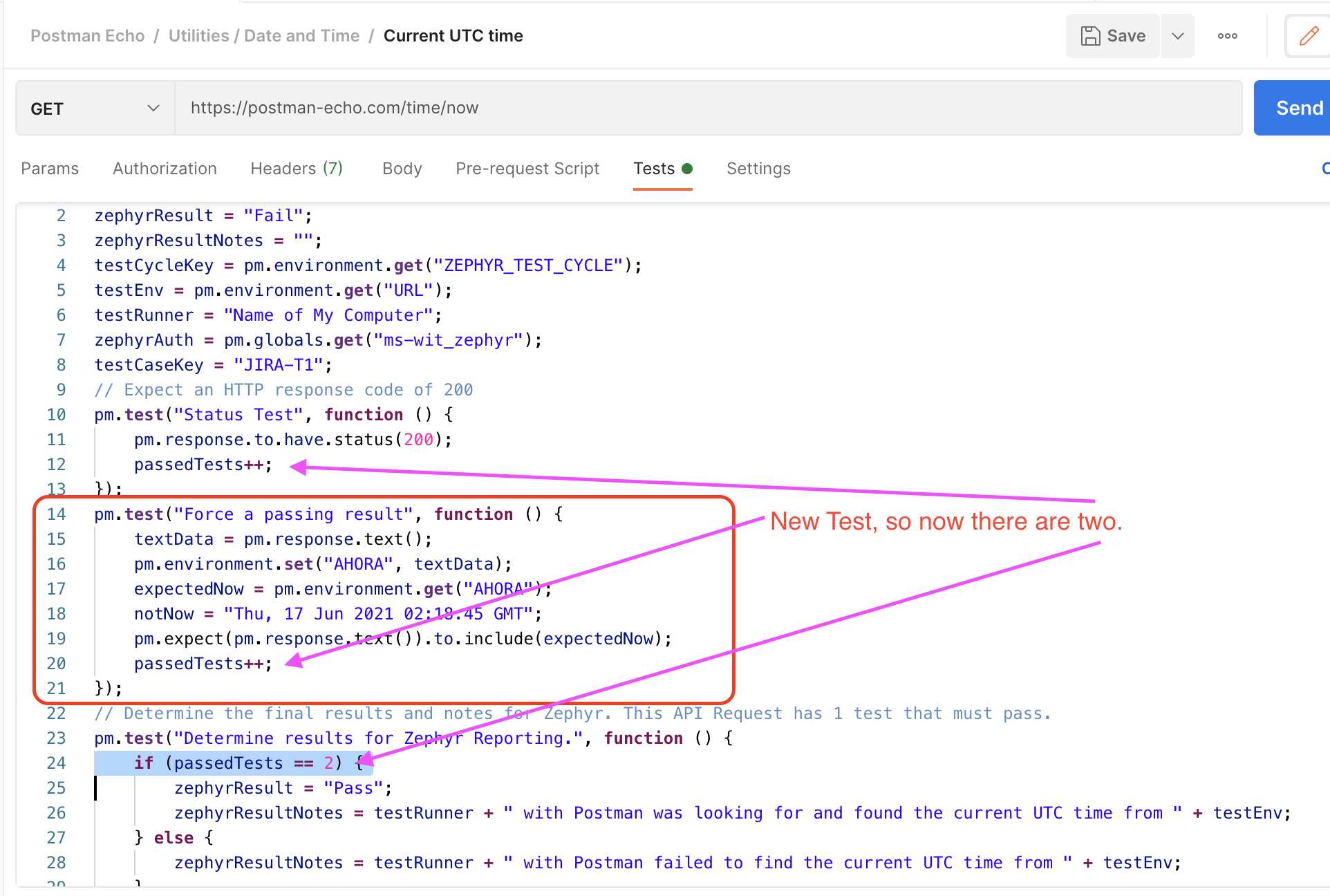
And now our Request has two assertions, or positive things that have to happen in order for the whole case to pass, I’ll change the if statement below from 1 to 2:
…
// Determine the final results and notes for Zephyr. This API Request has 2 tests that must pass.
pm.test("Determine results for Zephyr Reporting.", function () {
if (passedTests == 2) {
zephyrResult = "Pass";
…
Here’s a picture of the new code in context.
Forcing a Failure
Even if you’re new to testing, you may know a lot of ways to make a script fail. Who among us hasn’t had one typo muck up the whole works? But that’s not quite the kind of failure we’re after. We don’t want the test script to fail. If the script fails, we may not even get a result posted to Zephyr. And even if we get a failure recorded to Zephyr, it may be a false failure, meaning it wasn’t the API, the product under test that failed, but our own test. In order to be confident that we’ve written a good test, we want one or more assertions to fail by providing bad data.
And, by changing the assertion frompm.expect(pm.response.text()).to.include(expectedNow);
topm.expect(pm.response.text()).to.include(notNow);
when I had previously assigned a value from 1991 to the notNow variable, I can force the assertion to fail. This gives me confidence that should I suspect something has gone awry with the space-time continuum, I can run my trusty test and see the result in Jira.
Let’s Work Smarter, Not Harder
At the beginning of this post, I mentioned the changing Zephyr Scale URL for reporting results. With only one Request, a change like this is no big deal. You changeurl: 'https://api.adaptavist.io/tm4j/v2/testexecutions', intourl: 'https://api.zephyrscale.smartbear.com/v2/testexecutions',
in one test tab and go on with your day.
But if you have dozens, or hundreds, of requests, across multiple collections, you don’t want to spend hours editing each one and then hope you don’t miss one. Yes, you could even export each collection, and edit the resulting JSON files in a code editor, and then import the collections again, but there’s a another way.
We’ve already used several kinds of variables; request level, environment level, and global to name a few. The handy thing about these variables is the amount of data you can stuff into them. I’ve heard of people storing entire JavaScript libraries, downloaded from a CDN, in a variable in order to use it in their Collections.
We’re not going to do anything quite so big, but don’t rule it out if you really need something that Postman doesn’t already have.
How it Started
See the Pen Jira Zephyr via Postman B4 Reuse by MS-WIT (@ms-wit) on CodePen.
If we review the whole test on this request, we find several opportunities for reuse. Lines 1-7 are lines I can see using over and over again, so I’ll store them in a Collection level variable, named COMMON_VARS. Then, in my tests, I can access them all with 2 lines.
But first: We’re going to use the eval() function, so make sure you know, and can mitigate, the risks. There are loads of opinions on this topic for you if you’re not sure why this can be risky.
My first two lines of code, replacing lines 1-7, are now:
commonVars = pm.collectionVariables.get("COMMON_VARS");
eval(commonVars);
For me, the testCaseKey is unique for each request, so I’ll leave what was line 8 as it is. I could save the HTTP Response code test as another variable and just pass the expected integer as an argument, but I haven’t done that here. The HTTP Response code test is unlikely to change, and I like to see the assertion based tests so I don’t lose track of how many of them there are. Any time I can avoid the dreaded off-by-one error, I will. Speaking of assertion based tests, the next one is unique to this test case, so I’ll leave it too.
The next “test”, Determine results for Zephyr Reporting, is about six of one and half a dozen of the other whether or not to store and eval() it with passed in values or leave it. For the ease a readability, I’m going to leave it.
That leaves the last two “tests”, “Build Zephyr reporting request” and “Report to Zephyr.” For me, the only thing about lines 32-62 that can vary is the value of the testCaseKey variable, so I’m going to save all those lines into a Global level variable named LIB_REPORT_ZEPHYR and then use the eval() function again.
Remember I already have the testCaseKey defined in what is now line 3. As I save these lines as a Global variable, I’ll change the Zephyr Scale reporting URL in one line and it will be used for all my environments and collections.
How it’s Going
See the Pen Jira Zephyr via Postman with vars by MS-WIT (@ms-wit) on CodePen.
The value of my COMMON_VARS Collection level variable is:
passedTests = 0;
zephyrResult = "Fail";
zephyrResultNotes = "";
testCycleKey = pm.environment.get("ZEPHYR_TEST_CYCLE");
testEnv = pm.environment.get("URL");
testRunner = "Name of My Computer";
zephyrAuth = pm.globals.get("ms-wit_zephyr");
The value of my LIB_REPORT_ZEPHYR Global level variable is:
[note line 21 has the new Zepyr
// Get and set some variables to prepare for Zephyr reporting
pm.test("Build Zephyr reporting request.", function () {
    let bodyBuilderJson = {
        'projectKey': 'JIRA',
        'testCaseKey': testCaseKey,
        'testCycleKey': testCycleKey,
        'statusName': zephyrResult,
        'testScriptResults': [
            {
                'statusName': zephyrResult,
                'actualResult': zephyrResultNotes
            }]
    };
    let bodyBuilder = JSON.stringify(bodyBuilderJson);
    pm.environment.set("ZEPHYR_BODY_BUILDER", bodyBuilder);
});
// Actual Zephyr reporting.
pm.test("Report to Zephyr.", function () {
    var bodyBuilder = pm.environment.get("ZEPHYR_BODY_BUILDER");
    pm.sendRequest({
        url: 'https://api.zephyrscale.smartbear.com/v2/testexecutions',
        method: 'POST',
        header: {
            'Content-Type': 'application/json',
            'Authorization': zephyrAuth
        },
        body: bodyBuilder
    }, function (err, res) {
        pm.globals.set("token", res.json().access_token);
    });
});
And that’s how I do it. Stay tuned for future posts where I may add the schema validation, redo this work in Python, or who knows what.